Product design · AI workflow
MY ROLE
Product Designer
Tools
Figma, Figma Agent, Codex
Cross-functional team
Zhixiang Gao
Senior Frontend Engineer
Yunfeng Song
Lead Engineer
Vince Ge
Senior Tester
Tim Verdon
Product Manager
Sebastian Too
Product Owner
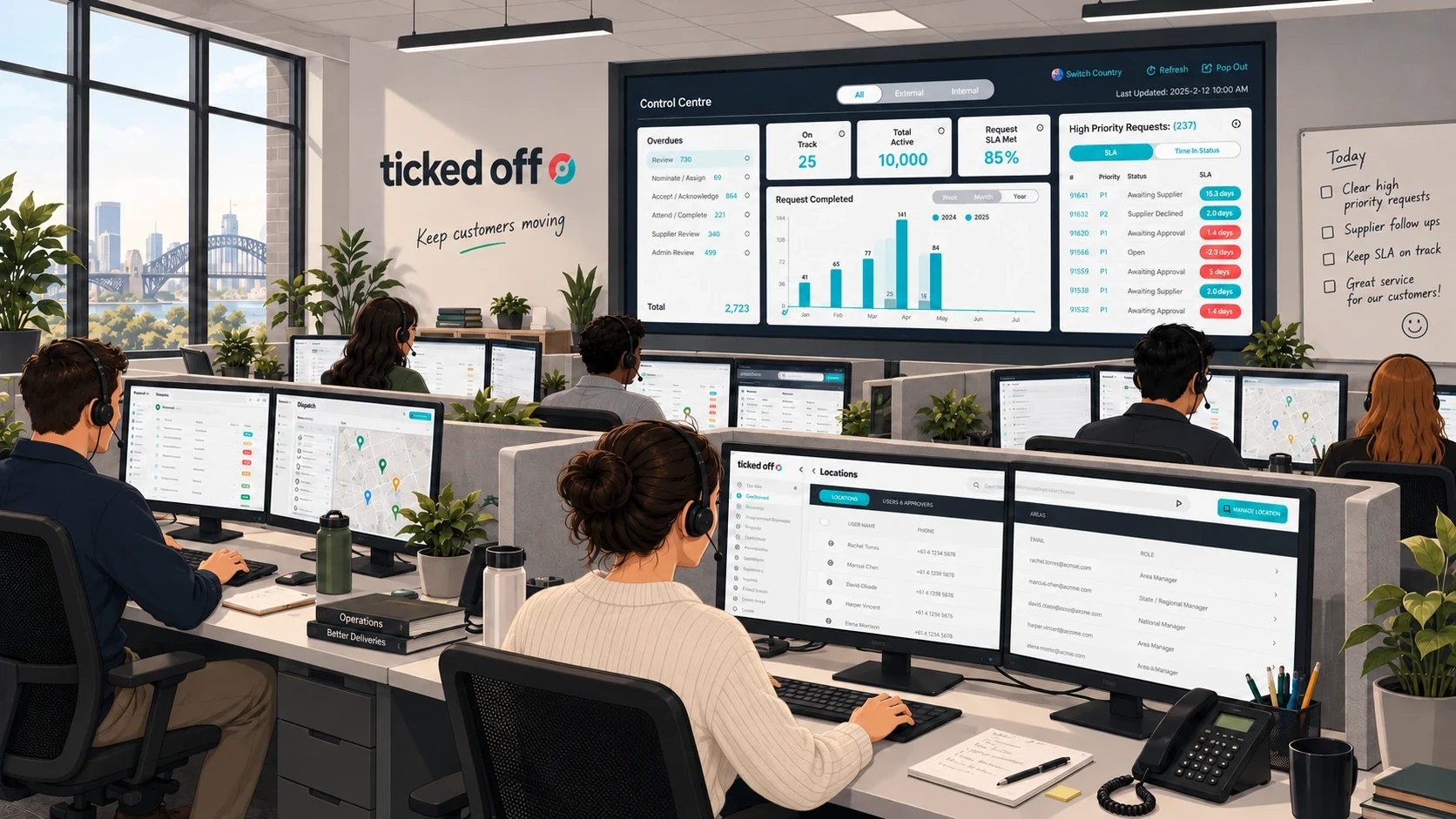
Ticked Off is an Australian facilities management company helping multi-site retailers coordinate repairs and maintenance. Its operations connect Work Requests, approvals, suppliers, attendance and financial processes across many locations.
Much of the platform was first built by engineers, before it had a dedicated designer. Ticked Off Admins (TOA) use it all day. My job was to add new features without breaking the patterns they already rely on.
I designed features for the platform, then directed AI to build the product knowledge and design system that let it do much of that work. This case study covers both.
120+
Jira tickets designed in my sprint files
7
user roles, each with its own navigation
18
product domains documented for AI
01 — Shopping Centre Batching
A Master Batch (MB) groups suitable Work Requests (WR) at the same Shopping Centre, so one supplier visit covers them.
Ticked Off already supported manual batching, but Ticked Off Admins did most of the coordination themselves. This project automated more of it.
HOW THE SAVING WORKS
Three visits become one.
Three stores in one Shopping Centre each need flooring work, and Store B also has an urgent repair. Without Batch, each Work Request gets its own supplier visit, and Ticked Off pays three call-out fees for the flooring alone. Admins coordinate every visit by hand.
Urgent work stays out. If a job cannot wait, the approver picks P1–P5 instead, and it is arranged on its own.
A second way in. During supplier nomination, a TOA can add a Work Request to an existing Master Batch, or nominate it separately.
Simplified, illustrative example. Grouping by subcategory was observed in a controlled Staging test; the rules are set per Shopping Centre and Category.
My responsibility

STEP 01
Understand the workflow
I worked with Ticked Off Admins to understand their daily workflow. I then reviewed the Shopping Centre Batching requirements with a Ticked Off manager, walking through the product together.

STEP 02
Compare the options
I compared designs for settings, approval and supplier selection, and checked how they worked together as one flow.

STEP 03
Review and refine
I discussed the designs with Ticked Off, engineers and QA, then revised the affected screens.
Batch touched five parts of the product, from setup to monitoring. In each one, I kept the existing pattern where I could, and left the decision to a person where it mattered.
Select a decision to see the screens and the reasoning.
Give Batch its own tab.
Problem
The original requirement put Batch controls inside the Shopping Centre settings page. That page already held addresses, trading hours, induction notes and contacts. Adding automation rules made the edit form longer and the view page busier.
Decision
We recommended a separate Batch Configuration tab inside each Shopping Centre, with its own view and edit screens.
Trade-off
One more tab and one more edit screen. In return, general details and Batch rules each have a clear place.
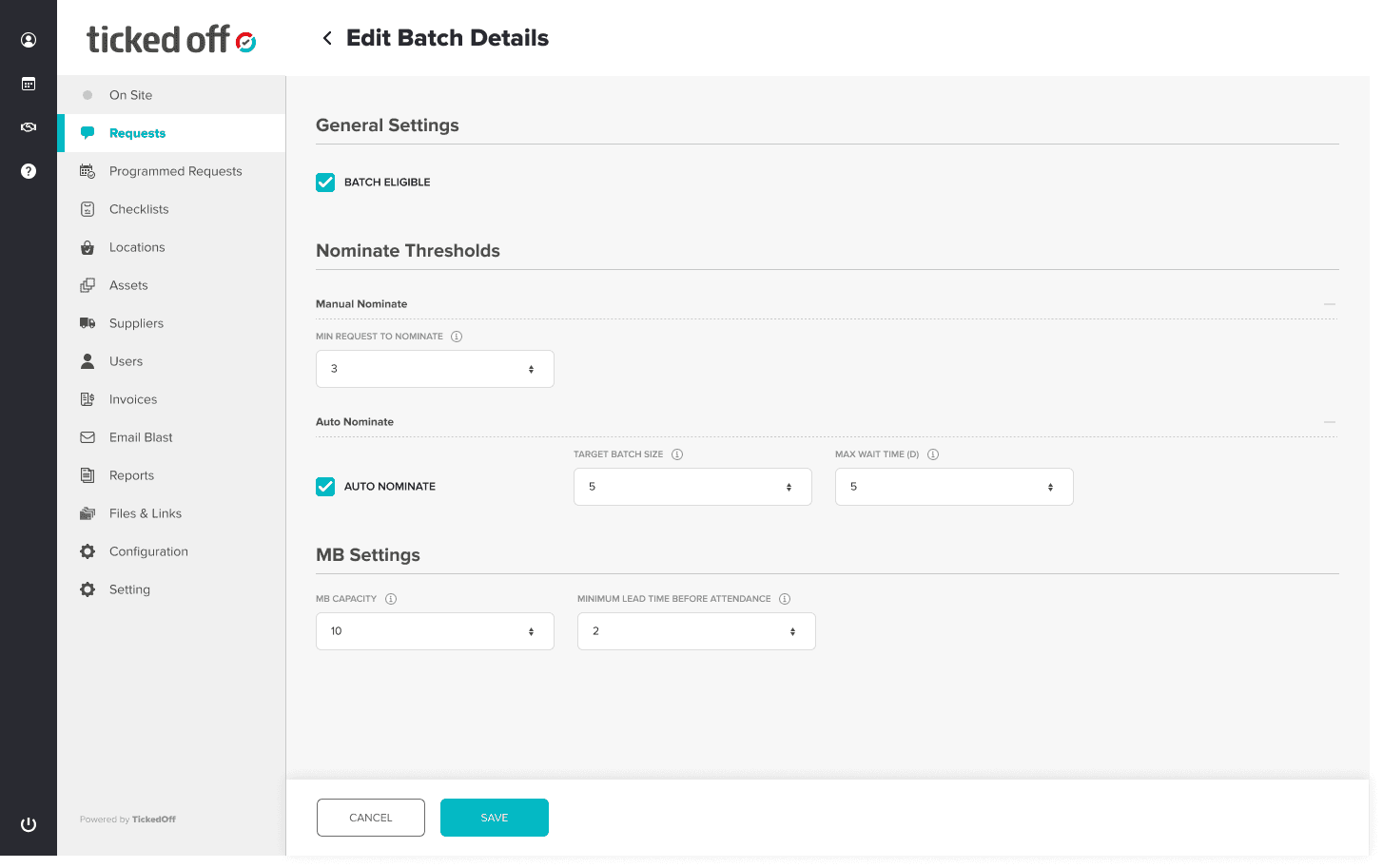 Only the Batch rules, in their own screen
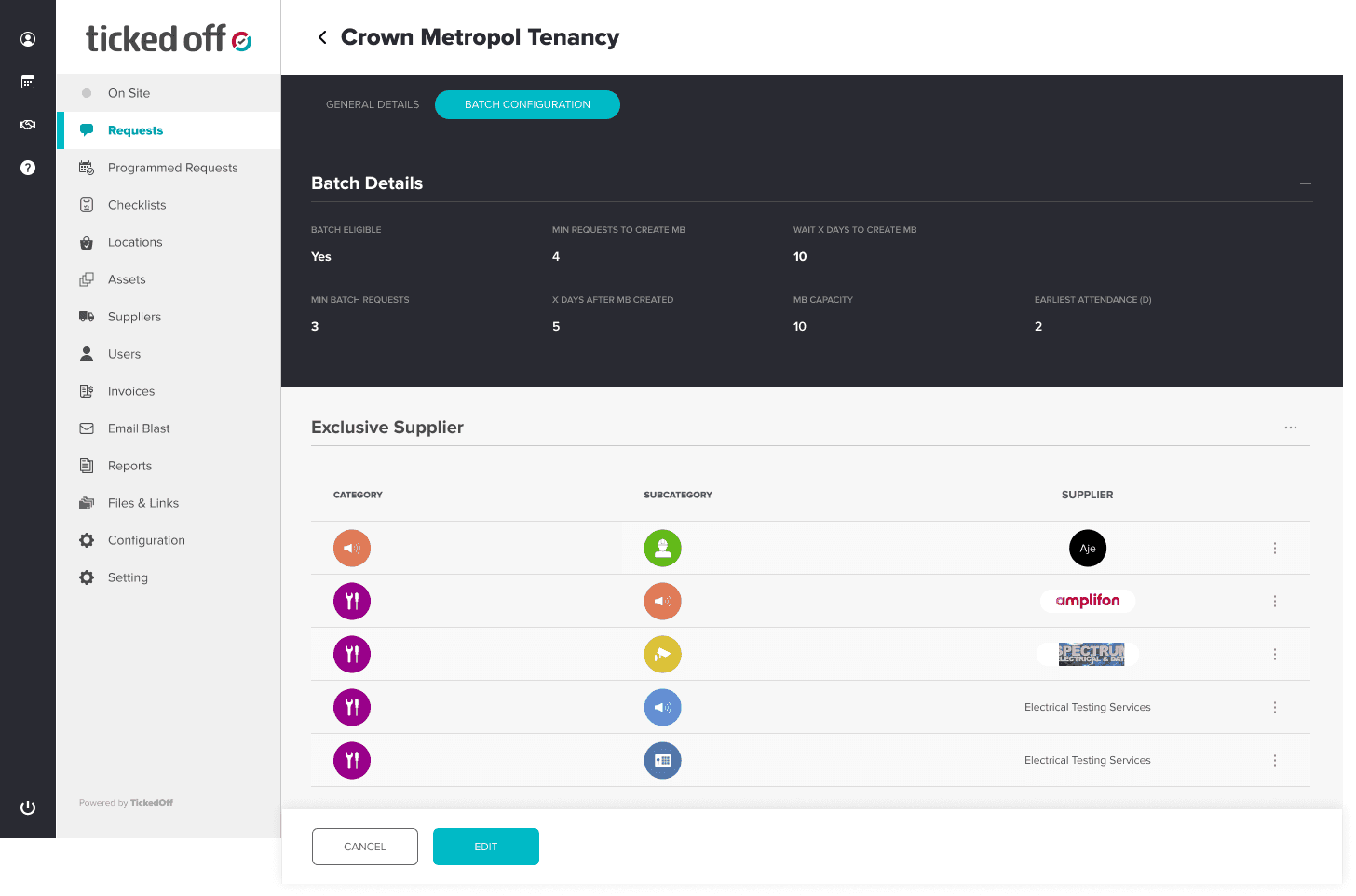 The new Batch Configuration tab
- Eligibility
- Whether this Shopping Centre can use Batch.
- Nomination
- A manual minimum, plus a target size and a maximum wait before work is offered to a supplier automatically.
- Capacity and lead time
- The most Work Requests a Master Batch can hold, and the minimum time before attendance once the supplier accepts.
- Maximum wait is before nomination. Lead time is after acceptance. They are separate settings on purpose.
SUPPLIER SIDE
One visit, one call-out fee
Store A · Work Request
job costs
Store B · Work Request
job costs
Store C · Work Request
job costs
Master Batch
call-out fee
The supplier is paid for one visit, shown in the Master Batch financials below.
STORE SIDE
Each store, its own bill
Store A bill
its own Work Request
Store B bill
its own Work Request
Store C bill
its own Work Request
Each store is billed only for its own Work Request. Sharing a visit never merges the bills.

Supplier side in the product: the Master Batch financials, with one row per Work Request, one call-out fee row and one total. Sample data from the design file, not real jobs or measured savings.
02 — The AI workflow
A ticket describes a change, not the whole product. When I gave AI only the ticket, it guessed. So I set AI up to build two things it could rely on: its own product knowledge, and a design system it could build with.
INPUT
Jira ticket
What should change
AI BUILT · I DIRECTED
Product Truth
What is true today, with evidence
AI BUILT · I DIRECTED
Design system
Approved parts and rules
AI
Draft
Codex and Figma Agent
DESIGNER
Review
What is right for the product
A · PRODUCT KNOWLEDGE
I gave Codex the product code and the product documentation first. With that knowledge, it walked through the whole Staging version of Ticked Off on its own.
It created roles, set up permissions, raised Work Requests and stepped through each approval level, checking what the code and documents said against what the product actually did.
Every finding became a fact with its source. I called the result Product Truth.
01 · I SUPPLY
Code and documentation
How the product is built, and what it should do
02 · CODEX
Walks through Staging
Creates roles and permissions, raises Work Requests, runs each approval level
03 · CODEX
Cross-checks all three
Where code, documents and the real product agree, and where they don’t
RESULT
Product Truth
Facts with their sources, and open questions kept open
The order matters. Sent into Staging with no knowledge, AI hits walls everywhere. With the code and documents already read, it knows what to try and what to expect, so the walkthrough is fast.
WHAT THIS UNLOCKED
ONE EXAMPLE, FROM THE BATCH WORK ABOVE
THE QUESTION
Do all Batch jobs at one Shopping Centre go into the same Master Batch?
A Jira ticket rarely answers this. Without product knowledge, AI can only guess.
THE FACT IN PRODUCT TRUTH
CONFIRMED
No. In a Staging test, flooring jobs and air-conditioning jobs at the same centre formed separate Master Batches. Jobs of the same type joined the same open Master Batch until it was full.
Source
One controlled Staging test
Last checked
Not recorded
Fact ID
BATCH-RULE-811ADEE8
WHAT IT RAISES IN THE REVIEW
Which types of work can share one visit?
Can a new job join a Master Batch that already has a supplier?
What happens when a Master Batch is full?
RULES AI MUST FOLLOW WHEN IT USES PRODUCT TRUTH
01
Show where every answer comes from.
02
Say how sure it is.
03
Treat a Jira ticket as a plan, not proof that something shipped.
04
If the evidence is missing or disagrees, say so. Do not guess.
18
parts of the product covered
1,810
facts written down
391
evidence files linked
163
open questions, kept open instead of guessed
Investigating is sometimes slower than asking the Product Owner. The difference is that the answer stays available for the next ticket, for me and for AI.
B · DESIGN SYSTEM
Ticked Off’s design files had passed through several designers, each with their own specs. Rebuilding the system every time a new designer joins does not scale, and the product keeps growing.
So the system had to be maintainable by AI from the start. People set the master patterns; AI generates the variants for each situation.
01 · DESIGNER
Set the master
One master pattern with its rules.
02 · FIGMA AGENT
Generate the variants
One for each role or situation.
03 · DESIGNER
Review
Check every result against the master.
01 · THE MASTER
Names AI can follow.
I designed one Master Menu first, with a clear layer structure: Left_menu, Clickable area, Menu + Logo, Nav - item.
With clear, repeated names, Figma Agent can find the same layer in every variant and change it the same way, instead of a designer editing each one by hand.
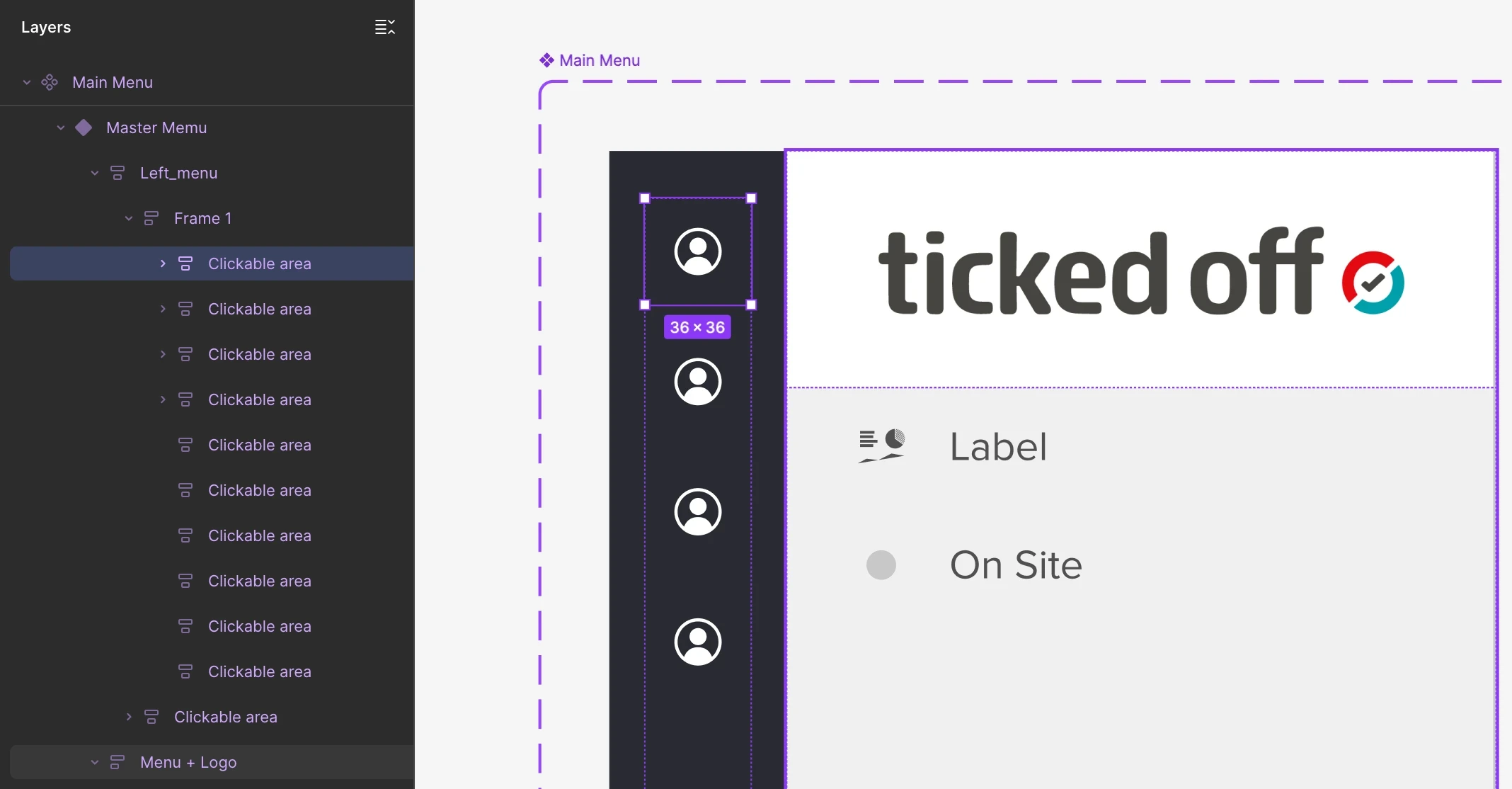
The Master Menu’s layer structure in Figma.
02 · THE VARIANTS
Figma Agent used the Master Menu, with screenshots of each role’s real navigation, to generate all seven role variants: work that would otherwise be built by hand, one role at a time. I reviewed every role.

Master Menu and role variants. Selected work in progress from an ongoing client design system; the full library is not shared.
03 — What changed in my role
With product knowledge and a component system in place, AI can draft much of the routine UI for a ticket. I built it that way on purpose. What is left is the work this case study is really about.
01
Deciding what is true
When docs, code and Staging disagree, someone has to mark it unknown or conflict instead of guessing.
02
Weighing the business
Batch trades waiting time for lower supplier cost. Where it sits in the approval list, and who can choose it, are product decisions.
03
Setting the master
AI can generate the variants. Deciding the master pattern they all follow is design.